Dienstag, 1. Dezember 2015

Installing .NET versions with wix bundles (and determine which one is already installed)

There's a nice help page from MS:
Which .NET does come with which OS and how do I determine what is installed: https://msdn.microsoft.com/en-us/library/bb822049(v=vs.110).aspx

For msi packages, there's an extension which does this work for you and determines whether e.g. .net 4.5 is installed: WixNetfxExtension, but the suggested PropertyRef (<PropertyRef Id="NETFRAMEWORK45"/>) doesn't work with burn.

So, for the bundle, the game is slightly different. Just do a:
<util:RegistrySearchRef Id="NETFRAMEWORK45"/>
this needs the utils extension.

And it'll only give you a version number, so you'll have to check against that. Which .net has which version number can be gleaned from the first link to MS, or from here.

Of course, there's already a stackoverflow answer for that :)

And finally, to install e.g. .NET 4.5 with your bundle, you can use this magic package group id in the chain if you use the NetFxExtension:

<Chain> <PackageGroupRef Id="NetFx45Web"/> </Chain>

That should make the bundle download the appropriate .NET framework. See also here: http://wixtoolset.org/documentation/manual/v3/howtos/redistributables_and_install_checks/install_dotnet.html

Donnerstag, 2. Juli 2015

Wix and msi installers: downgrade a library during a msi upgrade

Here's a tricky one I came across at work:

If you look closely, with an upgrade of OurProduct, we downgrade a library. So what? you say. (Hint: try not to ever do a library version downgrade! It's painful.)

Well, it turns out, that with xcopy, this problem would easily be solved. Your forfeit all the other kinda cool things that msi can do, though. Not the path we'd like to go.

So, what to do?

Just to show the baseline: this is the component of the initial OurProduct:
    <Component Id="Newtonsoft.Json" Guid="SOMEGUID-42FD-44B5-8C93-C245F85DF84E">
      <File Source="Newtonsoft.Json.dll" KeyPath="yes" /> <!-- version 5.0 -->
    </Component>

How do we downgrade that?
Ok, easy, just pack in the new lib, take the old component guid, and do configure major upgrades just like this:
<MajorUpgrade
     DowngradeErrorMessage="A newer version of [ProductName] is already installed." 
     Schedule="afterInstallValidate" />
this is the default scheduling used by Wix now, it will remove the old product first (that's the 'RemoveExistingProducts' Action), and then install the new product. That means, it removes this Newtonsoft.Json lib before it puts in the version of the upgrade.

Try #1 - fail

We also pack in the new version
<!-- Try #1 -->
    <Component Id="Newtonsoft.Json" Guid="SOMEGUID-42FD-44B5-8C93-C245F85DF84E">
      <File Source="Newtonsoft.Json.dll" KeyPath="yes" /> <!-- version 4.5 -->
    </Component>
same guid, same thing, lower version.
And it doesn't work:
Action start 17:32:45: CostFinalize.
.....
MSI (c) (38:C0) [17:32:45:977]: Disallowing installation of component: {SOMEGUID-42FD-44B5-8C93-C245F85DF84E} since the same component with higher versioned keyfile exists
Action ended 17:32:45: CostFinalize. Return value 1.

What please? Why does it exist?

As you can see, the msi plans the installation of components in the CostFinalize Action, which is pretty early in the whole InstallExecute sequence. And it's even before the first possible scheduling location of the removal of the old product. CostFinalize runs before InstallValidate. Damn.

What did I have on the system, after this upgrade above finished? The file was gone: the upgrade says it won't install it, the previous version removes it, the upgrade will not install it again => the file is gone. Solution? Repair the new product. But then it'd be easier to uninstall the previous product, and then install the new version. I looked on StackOverflow for help: http://stackoverflow.com/questions/15138731/wix-major-upgrade-not-installing-all-files, but the first answer didn't work for me. The file was even left in the higher version (5.0).

Try #2 - fail again

Ok, let's give it a new guid, then the old component is removed
<!-- Try #2, new guid!! -->
    <Component Id="Newtonsoft.Json" Guid="SOMEGUID-DE0F-4CC9-BC16-2FF543B2FA90">
      <File Source="Newtonsoft.Json.dll" KeyPath="yes" /> <!-- Version 4.5 -->
    </Component>
Well, we will still get
Disallowing installation of component: {SOMEGUID-DE0F-4CC9-BC16-2FF543B2FA90} since the same component with higher versioned keyfile exists
What please? This component is supposed to be new!?!
What the windows installer does here is compare keyfile paths (which probably means it compares the path of the key resource). So it sees the resource already lying there, in a higher version, and doesn't want to overwrite it.

Try #3 - finally succeed

In the end, I found out that there's still a chance how you can do it, but it's not nice:
<!-- Try #3, with still another guid -->
    <Component Id="Newtonsoft.Json.Fix" Guid="SOMEGUID-A46A-4C3E-801A-6F79B16CD0B4">
      <File Source="CarryOn.dll" KeyPath="yes" />
      <File Source="Newtonsoft.Json.dll" />
    </Component>
This works. It's not my idea, I found it somewhere, kudos to whoever wrote it.
This will make the installer look for the CarryOn dll, which can be any other dll where you go for higher versions with upgrades. The old installer will remove the old, higher versioned, Newtonsoft.Json, and the new installer will place the new, lower versioned, library.

There seem to be other answers to this problem out there. I didn't try them. They seem to require InstallShield, some other wix control elements like RemoveFile, scheduling of the RemoveExistingPRoducts to before CostFinalize or they even manipulate the msi directly by convincing it that the lib it has actually has a higher version. The latter will probably just create problems later:
http://stackoverflow.com/questions/30377613/downgrade-file-in-majorupgrade (schedule after CostFinalize)
http://stackoverflow.com/questions/4227456/windows-installer-deletes-versioned-file-during-product-upgrade-instead-of-down (schedule after CostFinalize)
http://stackoverflow.com/questions/14122136/how-can-i-make-sure-a-downgraded-library-is-installed-by-my-msi (hack the msi database)
http://stackoverflow.com/questions/25311969/how-to-downgrade-a-third-party-file-in-a-wix-msi (spoiler: the answer does not work)

It seems, that this is a seldom occurring problem, which doesn't really concern those who are in charge of the msi installer itself. So, rather try to not run into this problem. If you do custom compiles of open source stuff, maybe even chose to take a lower version than the current release which you probably end up using some time later.

Freitag, 22. Mai 2015

Downloading the Microsoft Azure SDK 2.3 (aka: why doesn't MS provide direct download links???)

I need this every now and then, and I'll always run into the Microsoft website's bad installation experience, which doesn't seem to work with chrome or Firefox - no, you need IE.
There is a web platform installer making this easier, but that unfortunately doesn't install the v2.3 Azure SDK.

I took those links from this MS site.

So here they are, and a little hint for me what I need for VS2013 and compiling Apps into Azure Roles:

WebToolsExtensionsVS.msi
WebToolsExtensionsVS2013.msi
WebToolsExtensionsVWD.msi
WebToolsExtensionsVWD2013.msi
WindowsAzureTools.vs110.exe
WindowsAzureTools.vs120.exe - my pick
WebToolsExtensionsVWD2013.msi
WindowsAzureStorageEmulator.msi - my pick
WindowsAzureLibsForNet-x64.msi - my pick
WindowsAzureLibsForNet-x86.msi
WindowsAzureEmulator-x64.exe - my pick
WindowsAzureEmulator-x86.exe
WindowsAzureAuthoringTools-x64.msi - my pick
WindowsAzureAuthoringTools-x86.msi

Mittwoch, 25. Februar 2015

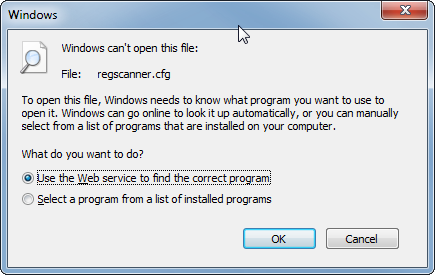
File associations with windows - especially: I can't set the default program for an extension anymore

This might expand in the future.. windows registry is deep ;)

My problem was, that using either of those 2 dialogs didn't help to set the default program. I chose a file, but no association was made. Why???
Neither here: Control Panel\All Control Panel Items\Default Programs\Set Associations
Nor here: Open with dialog
In the end, this link gave me the tip:
fire up regedit, go to
HKEY_CURRENT_USER\Software\Microsoft\Windows\CurrentVersion\Explorer\FileExts
and then delete the "OpenWithProgids" subkey from your extension:
The id is probably broken, who knows?
In any case, seems like the id prevented me from assigning a different default program. Once that's gone, you can re-assign any program with the extension that you want.

Freitag, 5. Dezember 2014

Debugging your deployed native release build on a remote machine with visual studio

Another cpp nightmare.
Debugging managed libraries remotely was rather easy. Have the remote debugging tools installed, run the code on the remote machine, attach to it via your local VS, have the right pdbs ready, done. You're debugging.

Of course, you should be sure that the pdbs actually match the dlls. That can be checked with an appropriate tool.

For native code, apparently, the debug symbols need to be placed into the same directory as on the remote machine. Like, if it's remotely in "C:\some\where\strange\myProg.exe", then you need to create this strange directory on your local machine as well.

I didn't find anything on the web which explicitly stated that.

Here are some other links, which might be of help:
http://www.codeproject.com/Articles/146838/Remote-debugging-with-Visual-Studio
Remote Debugging and Diagnostics (vs 2013)
and, of course, a most cited resource about pdb files in general (native and managed):
http://www.wintellect.com/blogs/jrobbins/pdb-files-what-every-developer-must-know

But they seem to deploy directly what you build to a remote machine, instead of having corporate release builds installed on them and then debugging them with the pdb files which the build machine thankfully published as well.

cpp c++ linker warnings which look like name mangling problems but are cause by classes not being exposed in the dll

Today, I wanted to write some tests for a cpp dynamic library under windows.
Such a build still generates the .lib file, like for static libs, but this .lib file only contains some header information or somesuch.
In the end, the .dll will be used.

Then, when I tried to compile the tests, I got this:
1>SwarmTests.obj : error LNK2001: unresolved external symbol "public: __thiscall Swarm::SpecificChainer::SpecificChainer(long,class std::basic_string<wchar_t,struct std::char_traits<wchar_t>,class std::allocator<wchar_t> > const &,class std::basic_string<wchar_t,struct std::char_traits<wchar_t>,class std::allocator<wchar_t> > const &,class Swarm::ZergLink *)" (??0SpecificChainer@Swarm@@QAE@JABV?$basic_string@_WU?$char_traits@_W@std@@V?$allocator@_W@2@@std@@0PAVZergLink@1@@Z) 1>C:\dev\mycode\SwarmTests\Debug\SwarmTests.exe : fatal error LNK1120: 1 unresolved externals

After several hours of despair, I found out that the class:
Swarm::SpecificChainer
was declared like this:
class SpecificChainer {
 ctor...
  ...
}


But should have been declared like this:
class DLL_PUBLIC SpecificChainer {
 ctor...
  ...
}


The keyword is DLL_PUBLIC which will expose this class to the users of the dynamic library. See here on gnu.gcc.org for further information. All non-exposed classes are only visible internally.

I still don't know, why it's done like this, whether this is only on windows (can't remember that on linux) and if it's common for all dynamic cpp libs, why they didn't invent some smart keyword for that, like in c#: internal.

Dienstag, 14. Oktober 2014

Modular build scripts with NAnt

We are using NAnt for our build process. Since the product is large, this amounts to things like this:
  1. clean up the source tree => clean slate
  2. build all projects (~50 mins) => compiled libraries and executables
  3. run all tests (~2 hours)
  4. run benchmarks
  5. create installer (msi/bootstrapper)
  6. publish to a file share
This all amounts to several thousand lines of nant code. And because we know naught about modularizing things and decoupling things, this all becomes basically one big nant file. That is not maintainable.

We tried to modularize things a bit by putting common code into nant files, like this:
<include buildfile=".\installer.prop" />
which are just included by other nant files. So, we kind of reduced code duplication a bit.

Problems remain:
  • you don't know where your property has been set for the first time
  • if it has been reset to something else
Additionally, we have to deal with the problem that by using nant we have to use a declarative language to do loops, maintain file lists, have few insight in how properties are kept in memory.
It's even difficult to see the workflow of this whole monster.

I currently think, that for such large projects nant is the wrong tool. I'd like to try rake.
However, maybe we're just using nant the wrong way.

There is a way we should use more to modularize all those build scripts and make them independent:
  • separate nant files, each of which does one thing, and one thing well. Kinda like the Single Responsibility Principle. It's code, after all.
  • have integrating nant files which call other nant files. Those integrating nant files should not have logic.
  • when calling other nant files, do not inherit the properties of your current state (to inherit is actually the default).
In practice, this would look like this:
<project name="integrator" basedir=".">
    <property name="baseDir" value="${project::get-base-directory()}" />
    <target name="build">
        <!-- we integrate stupid targets here.
                they do not contain logic, they just call someone else -->
        <call target="cleanBuildfiles" />
        <call target="buildSoftware" />
        <call target="buildInstaller" />
        <call target="publishSoftware" />
    </target>
    <target name="buildSoftware">
        <!-- inheritall="false" prevents the called nant scripts from
                inheriting all what we already might have screwed up.
                It's a fresh start. An error in this script doesn't
                affect those other scripts. Modular :) -->
        <nant 
            buildfile="${baseDir}\myFramework\default.build" 
            target="buildAll"
            inheritall="false">
            <properties>
                <!-- if that nant script depends on a certain global
                        variable, inject it -->
                <property name="CCNetLabel" value="${CCNetLabel}" />
            </properties>
            </nant>
    </target>
    <target name="buildInstaller">
        <nant 
            buildfile="${baseDir}\installer\default.build"
            target="buildInstaller"
            inheritall="false" >
            <properties>
                <!-- or directly give an apt name 
                        to such input variables -->
                <property name="BuildNumber" value="${CCNetLabel}" />
            </properties>
            </nant>
    </target>
</project>
I can't yet say that this will make nant easier to use, but I already feel that I have a better overview of what is done where. Maybe it will help me keep order and find errors in the future.